Assessing test results
I don’t understand my results. They seem inaccurate.
Speedtest measures the speed between your device and a test server, using your device’s internet connection. Several factors involved in the test can result in unexpected speeds.
Browsers (Chrome, Firefox, Edge, Safari, etc…) have different capabilities and may provide different results, particularly on high-speed connections. Using the Speedtest apps, instead of the website, usually provides more reliable results.
Devices (phones, tablets, PCs, etc…) can have very different Wi-Fi and cellular radio capabilities. Some devices may not be able to measure the full speed of your internet service. It’s also possible that your Wi-Fi router doesn’t support the full speed of your service.
What factors may impact my Speedtest result?
Speedtest measures the speed between your device and a test server, using your device’s internet connection. Several factors can impact the speed recorded by a test:
- Browsers (Chrome, Firefox, Edge, Safari, etc…) have different capabilities and may provide different results, particularly on high-speed connections.
- Devices (phones, tablets, PCs, etc…) can have very different Wi-Fi and cellular radio capabilities. This means you might get one Speedtest result on one device and a different result on another, even using the same provider. Some devices may not be able to measure the full speed of your internet service. It’s also possible that your Wi-Fi router doesn’t support the full speed of your service.
- Speedtest servers may perform differently. Generally, you will get faster speeds from servers closer to you. We recommend testing to a variety of test servers to get the most complete picture of your speed. Speedtest has the world’s largest testing server network, which means you will always have the benefit of testing to a server near your geographic location.
- Other speed testing services use different servers in different locations than Speedtest, so differences in speeds between testing services are not uncommon.
What should I do if my internet speed is slow?
Before you contact your internet service provider (ISP) or mobile carrier, check to see if you’re running any ongoing downloads or other programs like video chat that might be hogging your bandwidth. Close those and test again. If your Speedtest result still seems slow, reboot your phone or computer, modem and router. Then make sure that your router does not have any Quality of Service (QOS) features turned on. If that doesn’t fix the problem, here are a few more steps you can try.
Contacting your ISP or carrier for help is a good next step after you’ve gone through these steps. Keep in mind that on higher bandwidth connections (150 Mbps and above), you will need a higher quality router to keep up.
Why am I getting different speeds between my computer and my phone/tablet?
Speedtest is measuring your real-time network connection, so tests taken within a few minutes of each other might vary a little based on network congestion and available bandwidth. If your Speedtest results are significantly different, make sure that you’re:
- Testing the same connection. If one device is on Wi-Fi and the other is not, you’re testing the speeds of different connections.
- Testing to the same server. Speedtest automatically selects a server to test to based on ping, but you can also select a server to test to.
Also, note that there are large variations in Wi-Fi and cellular radio quality and MIMO stream handling quality between devices. These variations can cause a device to deliver slower test results than another device or computer.
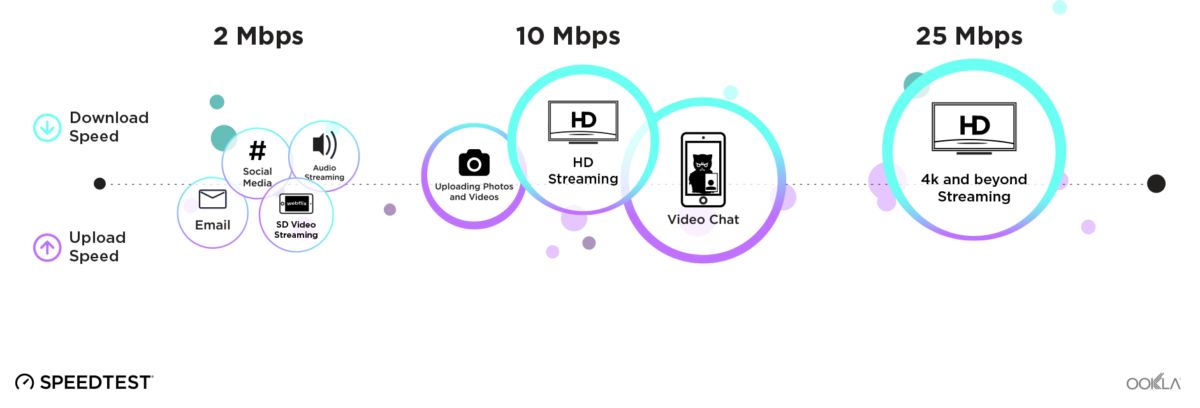
What speeds do I need for streaming or large downloads?
If you’re asking this question, you’re already sick of the wheel of constant buffering. To get the best possible performance, you generally want download speeds at least as fast as the following:
What speeds do I need to transfer large files?
You can transfer large files at any speed; it’s more a question of how long that transfer will take. Here are a couple of tables to help you out:
Time to transfer 1GB file
| Transfer speed (Mbps) | Theoretical time (Seconds) |
|---|---|
| 1.5 | 5,333 |
| 5 | 1,600 |
| 10 | 800 |
| 20 | 400 |
| 50 | 160 |
| 100 | 80 |
| 250 | 32 |
| 500 | 16 |
| 1,000 | 8 |
Data transferred per hour
| Transfer speed (Mbps) | Megabytes | Gigabytes |
|---|---|---|
| 1.5 | 675 | 0.675 |
| 5 | 2,250 | 2.25 |
| 10 | 4,500 | 4.5 |
| 20 | 9,000 | 9 |
| 50 | 22,500 | 22.5 |
| 100 | 45,000 | 45 |
| 250 | 112,500 | 112.5 |
| 500 | 225,000 | 225 |
| 1,000 | 450,000 | 450 |
What’s an acceptable ping (or latency) for online gaming?
If you’ve ever noticed that another player always seems to have the jump on you, that might be because they have a faster ping. Here’s a rough guideline:
- Game over: 200+ ms
- Winning: 0-59 ms
- In the game: 60-129 ms
- Struggling: 130-199 ms
What are Speedtest Experience ratings?
We have introduced four new Experience Ratings to Speedtest: Web Browsing, Online Gaming, Video Streaming, and Video Conferencing. These ratings help users better understand their Speedtest results and how they translate to real-world performance across a variety of common scenarios.
At the end of the Speedtest, each icon is assigned a 1-5 dot score (1: poor, 5: excellent), indicating the expected performance level for that activity. These icons represent online experiences that require varying levels of network performance.
New Experience Ratings and What They Mean

Web Browsing
General web activities such as browsing websites, scrolling through social media, and checking email require a stable internet connection but are the least demanding in terms of speed and latency. This icon reflects how well your network supports these everyday tasks.

Online Gaming
Playing games online—whether on a PC, console, or mobile device—requires a combination of sufficient download and upload speeds as well as low latency (Ping). High latency can cause lag, delays in player actions, and an overall poor gaming experience.

Video Streaming
The quality of your video streaming experience depends primarily on high download speeds and low latency. If latency is too high or speeds fluctuate, you may experience buffering, interruptions, or a reduction in video resolution.

Video Conferencing
For smooth video calls, both high download and upload speeds are important. Low latency is crucial for keeping video and audio in sync, whereas excessive latency can lead to delays, choppy video, and distorted or out-of-sync audio.
Interested in seeing your Speedtest Experience Ratings? Take a Speedtest to find out!